Satellite FUN is a C# application which predicts satellite passes , tracks satellites in a list, automatically starts RF recording (HDSDR or SatDump) and processing (SatDump).
It’s just a hobby project and the goal is mainly unattended / automatic Weather/ Earth observation satellite reception on L and X band etc.

It supports the SPID RAS/BIG RAS rotators including the HR version through the Rot2Prog protocol (0.1 / 0.5 / 1 deg) , the e-Callisto DiSEqC controller and other AZ/EL rotators through HamLib.
I use it to automatically control :
–> The SPID BIG RAS HR antenna rotator or 2x DiSeqC in X-Y config
–> The frequency / gain / sampling rate etc of my AIRSPY , LimeSDR etc
–> The frequency of the Kuhne Local Oscillator in my downconverter.
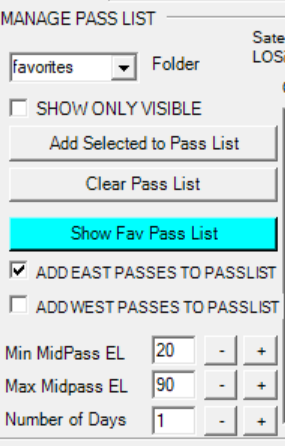
For the favorite satellites it calculates a pass list which can then be tracked automatically.

Satellite position calculation is done using David Taylor’s DJTSatLib.dll
In the Rot2Prog case , it writes commands directly to its serial port , which allows for faster position update. This mode is what I use on X band , allowing position update every 0.5s.
In the HamLib case, tracking is somewhat slower, as by default position update interval is set to 3s (can be further reduced though). This may already be more than enough for many applications though.
In the e-Callisto case it sends position commands to the controller using a pair of DiseqC Satellite TV motors in X-Y configuration.


Some more details:
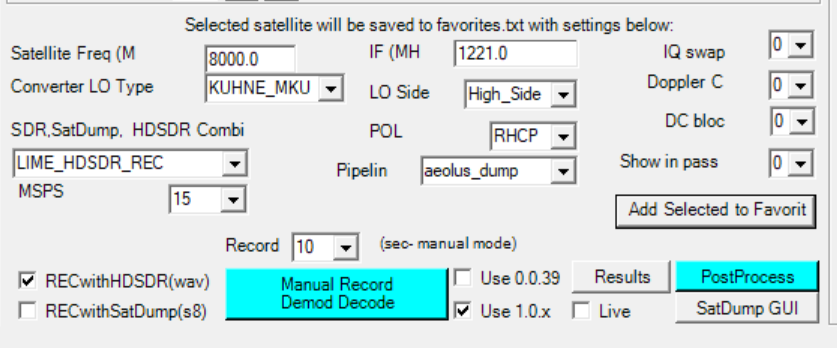
-One can manually launch HDSDR / SatDump with the proper settings per satellite (sampling rate, frequency etc). These can then be saved in the favorites.txt file.
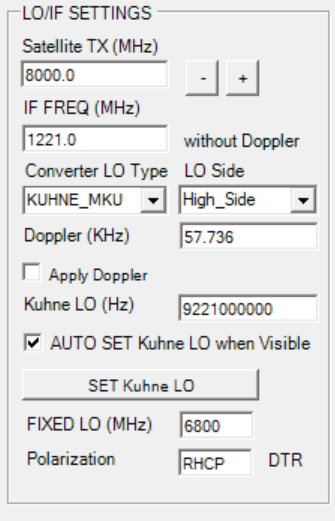
-When the satellite being tracked becomes visible , it automatically programs the 54 MHz -13 GHz Kuhne MKU Local Oscillator. This is the main Local Oscillator I use in my downconverter for frequencies not covered by Airspy / LimeSDR.
-Antenna pointing offsets can be changed on the fly.

-There is a favorite satellite list (favorites.txt) with Satellite TX frequency, Recording sampling rate and other satellite specific parameters

-Automatic whole favorite list tracking / recording and or postprocessing (SatDump demode/decode)

– Can reset Lime’s driver using pnputil or power-cycle it using the RTS signal of a COM port. This is useful when Lime occasionally hangs . With this feature it will be restarted just before the satellite becomes visible (no more Lime crashes …)

-Switches antenna polarization using the DTR signal of a COM port. This signal can go to a coaxial switch and select RHCP/LHCP.


INSTALLATION NOTES:
STEP1 , install the DJTSatlib.dll
If this is not done, it will not run !
64 bit : Right click on register_DJTSatLib.ps1 and run in PowerShell.
32 bit : Right click on register_djtsatlib.bat and run as administrator.
If the above does not work for some reason , try below:
On 64 bit systems:
First copy the DJTSatlib.dll to your Windows\SysWOW64 folder and
register the dll being in that folder. This can be done as follows :
Open a cmd window as Administrator –> Start/All Programs/Accessories .
Then Right click and Select “Run as Administrator”.
Then change folder to Windows/SysWow64 by typing :
cd C:\Windows\SysWOW64
Now type:
regsvr32 DJTSatlib.dll
On 32 bit systems:
Enter the unzipped folder and double-click on “install djtsatlib.bat”.
This is only needed once, when the program is installed for the first time.
If this does not work try the following:
Copy/paste the dll into Windows/System32 folder and register the dll in there.
This can be done by first opening a cmd window (Start/All Programs/Accessories).
On W7 cmd must be opened as admin so Right click and Select “Run as Administrator”
In the cmd window that has just opened, change folder to Windows/System32
by typing :
cd C:\Windows\System32
Now type:
regsvr32 DJTSatlib.dll
Important Note:
Windows 7/8/10 users must be administrators to successfully register the dll.
STEP2, move HDSDR DLLs
Unzip the contents and you will get 2 folders , one containing Satellite FUN and another one with HDSDR ExtIO dlls.
I have included the Airspy ExtIO dll and 2 ExtIO dlls for the LimeSDR.The official one (ExtIO_LimeSDR_1.07.dll) supports sampling rates up to 30 MSPS.
Jean-Luc Milette kindly granted permission to include his custom dll (ExtIO_LimeSDR_WxSats_to_share.dll ) which supports rates up to 60 MSPS. Many thanks Jean-Luc for providing these! These dlls should be pasted to the HDSDR folder .
STEP3 , run the SatelliteFUN exe file
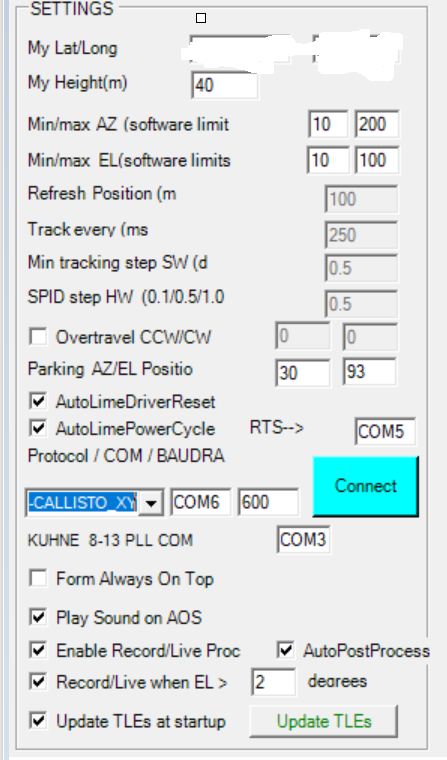
Edit My lat/ My long / My height in the text boxes.
Please note, that the program uses the dot for decimal separation , not the comma symbol !
In the config file and in the textboxes please use the dot not make sure that that the dot is used.
Edit Min/max AZ and EL software limits, Park Position . Enable over travel if supported and edit CCW/CW angles.
Select Rotator protocol for SPID (0.1 for HR/ 0.5 for BIG RAS / 1 for RAS) or Hamlib . Select Baud Rate and Comport .
For HAMLIB use , you also need to edit rotator.bat file:
For example , for my old Rot2Prog BIG RAS controller , I just have 2 lines.
rotctld -m 901 -r COM4 -s 600
PAUSE
For SPID BIG RAS HR (MD-02), just these 2 lines are needed after editing your com port and connection speed:
rotctld -m 903 -r COM4 -s 19200
PAUSE
Edit Comport for the KUHNE MKU LO if used.
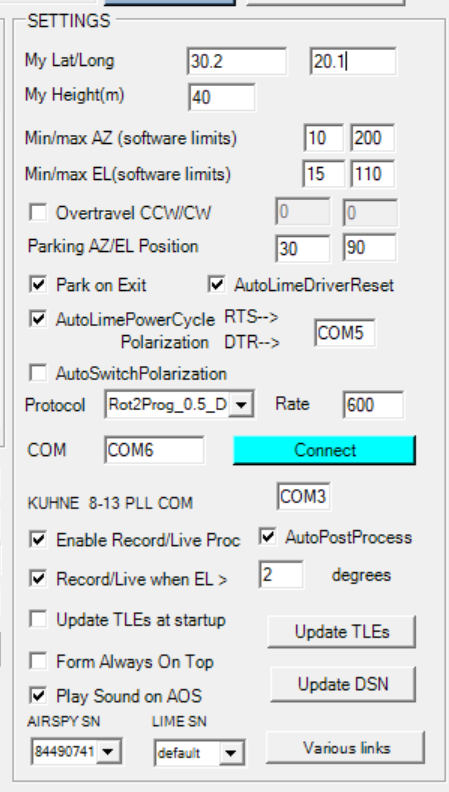
When done , restart the program saving first the config.txt when asked.
One can also edit the config.txt file directly. For the new settings to take effect , it is always good practice to save the config.txt file and then restart the program !
GETTING STARTED:
The program does not automatically connect to your rotator.
Hit the Connect button and then try to read back its position to see that it works.

You can use the GO TO AZ/EL buttons to check it goes where instructed.
Please open the config .txt file and edit the paths to HDSDR / HAMLIB / SatDump as required. You will find the lines below:
…..
HDSDR_PATH %PROGRAMFILES(X86)%\HDSDR\
HAMLIB_BIN_PATH %PROGRAMFILES(X86)%\hamlib-w64-4.1\bin\
SATDUMP_PATH_NEW C:\satdump_240823\build\Release
RECORDINGS_PATH D:\Recordings
SATDUMP_RESULTS_PATH D:\Results
….
If recording will be done with SatDump (>-1.0.0) , then sampling rate, folders etc are passed with command line calls. But This is not supported by HDSDR.
For automatic HDSDR launch with the proper dll, sampling rate and recording folder, some preparatory work is needed to create the profiles and store them in registry .

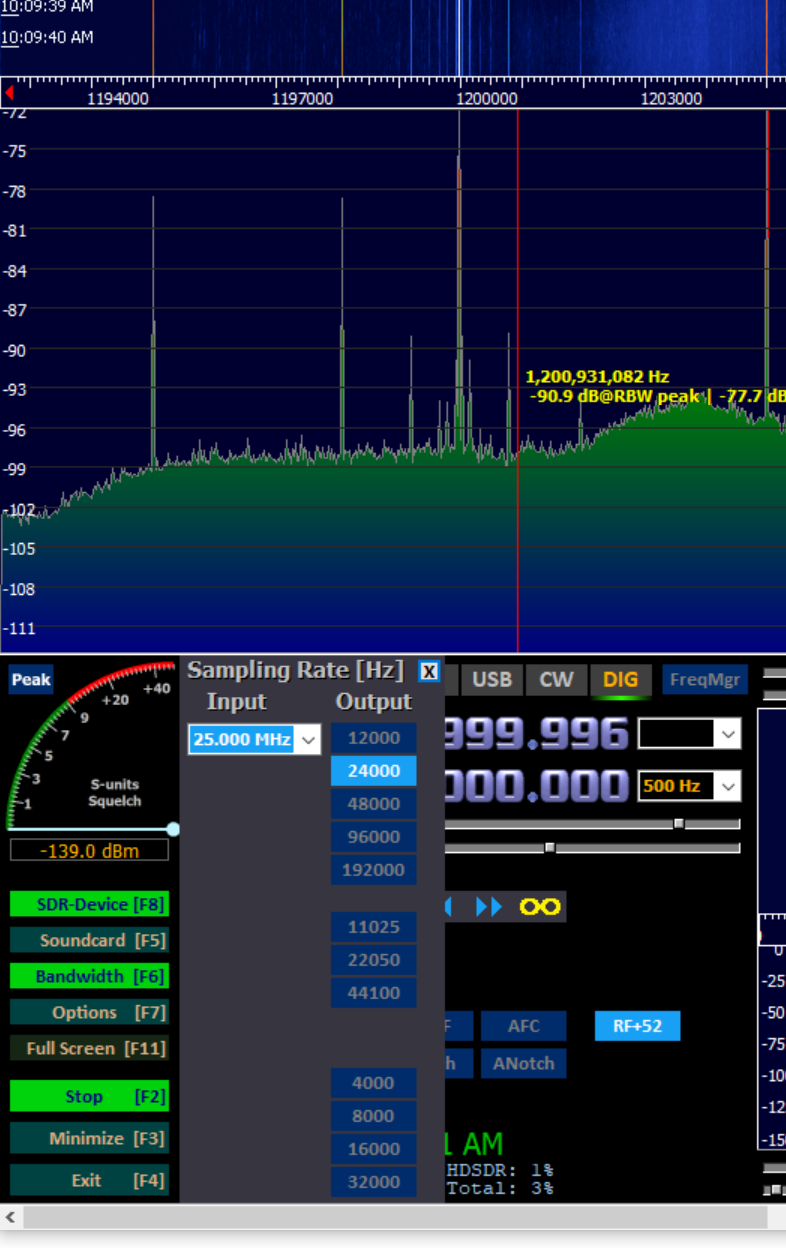
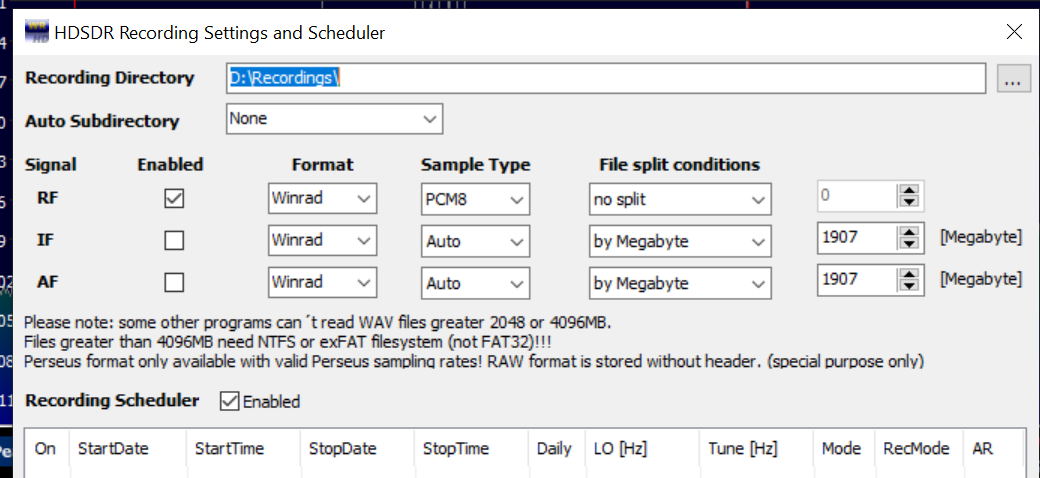
For each item with HDSDR in its name in the “SDR,SatDump,HDSDR” combo-box and for each supported sampling rate from the “MSPS” combo-boxes a registry entry needs to be configured. After selecting the desired combination , hit the big button “Manual Record Demode Decode”. When HDSDR starts, first immediately stop recording and then take your time to select the corresponding sampling rate (same as in MSPS box) , edit recording folder, gains etc and then exit. . These will be stored in the registry and from now on loaded automatically.
For example , for Suomi NPP I record with 25 MSPS. So I need to create a HDSDR profile for this. To do that first LIME_SDR_REC is selected in the combo-box , then MSPS is set to 25 and the big button is hit. It will start HDSDR with some default setting the first time. First recording is stopped, then the Sampling rate should be changed to 25 MSPS and the recording folder and related settings should be edited. After closing HDSDR , next time it will open with the correct settings. This procedure needs to be repeated for the combinations needed ( Lime/AIRSPY/sampling rates) as defined in the favorites.txt file.
 Michael Margaras SV1CAL - Amateur Radio and Electronics